Microsoft recently released new licensing information for SQL Server 2012. To understand how SQL Server will be licensed, we first must quickly review how Microsoft
has partitioned their editions of SQL Server. There will be three editions to license, Enterprise, Business Intelligence and Standard.
Enterprise
The Enterprise edition includes AlwaysOn, Columnstore, Max virtualization and the Business Intelligence capabilities.
Enterprise licenses will be core-based.
Business Intelligence
The new edition, Business Intelligence, will include Power View, Reporting, Analytics, Data Quality Services, Master Data Services and the Standard editions
capabilities.
Business Intelligence licenses will be Server and CAL based.
Standard
The Standard Edition offers the basics of database services, reporting and analytics.
Standard licensing will be both core-based and Server and CAL based.
For more information, Microsoft's SQL 2012 website.
Sunday, November 6, 2011

Saturday, November 5, 2011
Operator Icons
When I'm documenting execution plans, I always find myself copying, pasting and cropping. I've started saving these operators so that I can re-use them. Below are icons for you to use and I will continue to add to these as I encounter reasons for me to document them.
 |
 |
 |
 |
 |
 |
 |
 |
 |
 |
 |
 |
Friday, November 4, 2011
Moving TempDB
The following script will allow you to move tempdb to a new location. After the script has run, a restart of the sql server services is required. You will probably want to delete the old files in their old locations after the move and restart.
USE master
GO
ALTER DATABASE tempdb
MODIFY FILE (NAME = tempdev, FILENAME = 'T:\tempdb.mdf')
GO
ALTER DATABASE tempdb
MODIFY FILE (NAME = templog, FILENAME = 'T:\templog.ldf')
GO
USE master
GO
ALTER DATABASE tempdb
MODIFY FILE (NAME = tempdev, FILENAME = 'T:\tempdb.mdf')
GO
ALTER DATABASE tempdb
MODIFY FILE (NAME = templog, FILENAME = 'T:\templog.ldf')
GO
Hash Join comparison for larger data sets
Building upon my example from my Hash Join post, the following code outputs 3 execution plans that illustrate the efficiency of hash joins when working with large data sets.
I was able to get the query optimizer to use each kind of physical join operator by supplying a hint.
select * from AdventureWorks.Sales.Customer c
left join AdventureWorks.Sales.SalesOrderHeader soh on c.CustomerID = soh.CustomerID
select * from AdventureWorks.Sales.Customer c
left join AdventureWorks.Sales.SalesOrderHeader soh on c.CustomerID = soh.CustomerID
option (merge join)
select * from AdventureWorks.Sales.Customer c
left join AdventureWorks.Sales.SalesOrderHeader soh on c.CustomerID = soh.CustomerID
option (loop join)
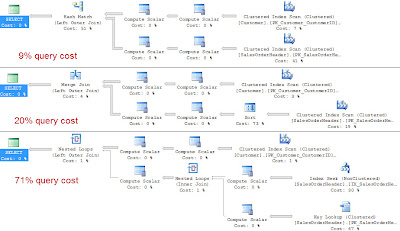
I was able to get the query optimizer to use each kind of physical join operator by supplying a hint.
select * from AdventureWorks.Sales.Customer c
left join AdventureWorks.Sales.SalesOrderHeader soh on c.CustomerID = soh.CustomerID
select * from AdventureWorks.Sales.Customer c
left join AdventureWorks.Sales.SalesOrderHeader soh on c.CustomerID = soh.CustomerID
option (merge join)
select * from AdventureWorks.Sales.Customer c
left join AdventureWorks.Sales.SalesOrderHeader soh on c.CustomerID = soh.CustomerID
option (loop join)

Thursday, November 3, 2011
Hash Join
SQL Server supports three physical join operators: Nested Loops, Merge and Hash.
The hash join works well for large sets of data. The hash join has two phases, the build and probe. First in the build phase, the rows are read from the first table and hashes the rows based on the join keys and creates has table in memory. The second phase, the probe phase, the hash join reads all the rows from the second table and hashes these rows based on the same join keys. The hash join then returns the matching rows.
In pseudo-code, it shall look something like the following.
for each row Row1 in the build Table
begin
perform hash value calc on Row1 row join key
insert Row1 row into hash bucket
end
for every row Row2 in the probe table
begin
calc the hash value on row Row2 join key
for every row Row1 in the hash bucket
if row Row1 joins with row Row2
return (row Row1, row Row2)
end
Below is an example of a select statement in which the optimizer should use a merge join operator.
select * from AdventureWorks.Sales.Customer c
left join AdventureWorks.Sales.SalesOrderHeader soh on c.CustomerID = soh.CustomerID

SQL Server tries to use the smaller of the two tables as the build table. SQL Server does this to try and reserve precious memory. While SQL Server attempts a best guess at guessing the amount of memory needed, if SQL has guessed to low it will spill out to tempdb to continue joining for the hash join operation.
The hash join works well for large sets of data. The hash join has two phases, the build and probe. First in the build phase, the rows are read from the first table and hashes the rows based on the join keys and creates has table in memory. The second phase, the probe phase, the hash join reads all the rows from the second table and hashes these rows based on the same join keys. The hash join then returns the matching rows.
In pseudo-code, it shall look something like the following.
for each row Row1 in the build Table
begin
perform hash value calc on Row1 row join key
insert Row1 row into hash bucket
end
for every row Row2 in the probe table
begin
calc the hash value on row Row2 join key
for every row Row1 in the hash bucket
if row Row1 joins with row Row2
return (row Row1, row Row2)
end
Below is an example of a select statement in which the optimizer should use a merge join operator.
select * from AdventureWorks.Sales.Customer c
left join AdventureWorks.Sales.SalesOrderHeader soh on c.CustomerID = soh.CustomerID

SQL Server tries to use the smaller of the two tables as the build table. SQL Server does this to try and reserve precious memory. While SQL Server attempts a best guess at guessing the amount of memory needed, if SQL has guessed to low it will spill out to tempdb to continue joining for the hash join operation.
Wednesday, November 2, 2011
Merge Join
SQL Server supports three physical join operators: Nested Loops, Merge and Hash.
The merge join requires that each table be sorted on the join keys. The merge join works by simultaneously reading and comparing the two sorted tables one row at a time. At each row, the merge join compares the next row from each table. If the rows match, the merge join outputs the joined row and continues on. If the rows do not match, the merge join discards the lesser of the two rows from the tables and continues. Because the tables are sorted, the merge join knows that it is discarding a row that is less than any remaining rows in either table.
In pseudo-code, it shall look something like the following.
get first row Row1 from Table1
get first row Row2 from Table2
while not at the end of either Table
begin
if Row1 joins with Row2
begin
return (Row1, Row2)
get next row Row2 from Table2
end
else if Row1 < Row2
get next row Row1 from Table1
else
get next row Row2 from Table2
end
Below is an example of a select statement in which the optimizer should use a merge join operator.
select * from AdventureWorks.Person.Contact e left join AdventureWorks.HumanResources.Employee c on c.ContactID = e.ContactID

Performance of the merge join is associated to the number of rows in each table. A merge join more than likely is a better choice for larger inputs compared to a nested loops join. Each table in the merge join is read only once.
The merge join requires that each table be sorted on the join keys. The merge join works by simultaneously reading and comparing the two sorted tables one row at a time. At each row, the merge join compares the next row from each table. If the rows match, the merge join outputs the joined row and continues on. If the rows do not match, the merge join discards the lesser of the two rows from the tables and continues. Because the tables are sorted, the merge join knows that it is discarding a row that is less than any remaining rows in either table.
In pseudo-code, it shall look something like the following.
get first row Row1 from Table1
get first row Row2 from Table2
while not at the end of either Table
begin
if Row1 joins with Row2
begin
return (Row1, Row2)
get next row Row2 from Table2
end
else if Row1 < Row2
get next row Row1 from Table1
else
get next row Row2 from Table2
end
Below is an example of a select statement in which the optimizer should use a merge join operator.
select * from AdventureWorks.Person.Contact e left join AdventureWorks.HumanResources.Employee c on c.ContactID = e.ContactID

Performance of the merge join is associated to the number of rows in each table. A merge join more than likely is a better choice for larger inputs compared to a nested loops join. Each table in the merge join is read only once.
Tuesday, November 1, 2011
Nested Loops Join
SQL Server supports three physical join operators: Nested Loops, Merge and Hash.
The nested loops join takes each row from the outer table and compares it to each row in the inner table and returns rows that are satisfied by the join predicate.
In pseudo-code, it shall look something like the following.
for each row Row1 in the outer table Table1
for each row Row2 in the inner table Table2
if Row1 joins with Row2 (predicate)
return (Row1, Row2)
Below is an example of a select statement in which the optimizer should use a nested loops join operator.
select * from AdventureWorks.HumanResources.Employee e
inner join AdventureWorks.Person.Contact c on e.ContactID = c.ContactID

The nested loops join performance is directly related to the number of rows in the outer table times the number of rows in the inner table. As the number of rows increase in the inner table, the cost grows quickly.
The nested loops joins is said to work best for small data sets and or where there is an index on the inner table.
The nested loops join takes each row from the outer table and compares it to each row in the inner table and returns rows that are satisfied by the join predicate.
In pseudo-code, it shall look something like the following.
for each row Row1 in the outer table Table1
for each row Row2 in the inner table Table2
if Row1 joins with Row2 (predicate)
return (Row1, Row2)
Below is an example of a select statement in which the optimizer should use a nested loops join operator.
select * from AdventureWorks.HumanResources.Employee e
inner join AdventureWorks.Person.Contact c on e.ContactID = c.ContactID

The nested loops join performance is directly related to the number of rows in the outer table times the number of rows in the inner table. As the number of rows increase in the inner table, the cost grows quickly.
The nested loops joins is said to work best for small data sets and or where there is an index on the inner table.
Subscribe to:
Posts (Atom)