When you are choosing a data type to store your numerics, there are some questions you need to ask yourself.
1) Do you want your numeric to remain exact?
2) How precise do you want your numeric to be?
3) How much storage are you willing to give to your data type?
Exactness versus Approximation
There are two types of numerics in SQL Server, Exact numerics and Approximate numerics. Exact numerics garauntee the value will remain the same without losing
precision do due rounding. Approximate numerics provide less precision.
There are two types of approximate numerics in SQL Server, float and real.
All other numerics in SQL Server are exact: decimal, number, money, small money, big int, int, small int, tiny int and bit.
If you are storing numerics for financial purposes, you would use an exact numeric data type.
Below is a link on approximate data types in SQL Server, specifically, float.
http://sqlblogcasts.com/blogs/grumpyolddba/archive/2007/10/26/do-you-use-the-float-datatype.aspx
Precision & Scale
The decimal and numeric data types have a fixed precision and scale. I want to quickly mention that there is no difference between the decimal and numeric data types.
Precision is ther number of digits that can be stored to the left and right of the decimal point. Scale is the number of digits that can be stored to the right of the
decimal.
If you need scale, then you would not use any of the whole number data types (big, int, small, tiny, bit).
Both the money and small money data types provide scale to 4 decimal places. If you need further digit representation beyond a scale of 4, you should use either decimal or numeric.
Storage
When planning for very large databases, you need to carefully choose the kinds of data types to use to store your numerics.
decimal and numeric can store up to 17 bytes
float 8 bytes
real 4 bytes
money 8 bytes
small money 4 bytes
bit int 8 bytes
int 4 bytes
small int 2 bytes
tiny int 1 byte
bit (1-8 bits = 1 byte)
Enjoy!
Thursday, November 8, 2012

Monday, February 27, 2012
Data Type Conversion Chart
Below is a helpful data type conversion chart. I did not create this, but I wanted to share it because it is very useful. The chart and full article can be found @ http://msdn.microsoft.com/en-us/library/ms187928.aspx


Thursday, December 1, 2011
More Version Detection
I discovered a couple of more ways to detect version information while studying for a certification exam.
xp_msver
select @@MICROSOFTVERSION
Most of you reading this were probably already aware, but I'm a career student of SQL Server and there's always more to learn. Enjoy.
xp_msver
select @@MICROSOFTVERSION
Most of you reading this were probably already aware, but I'm a career student of SQL Server and there's always more to learn. Enjoy.
Wednesday, November 16, 2011
Session and Request detail dump
Below is a query I use to retrieve all session and request details on a given sql server. This provides me a nice dump with lots of columns to sort through.
select
c.most_recent_session_id as ConnectionMostRecentSessionID,
c.connect_time as ConnectionConnectTime,
c.net_transport as ConnectionTransport,
c.protocol_type as ConnectionProtocolType,
c.protocol_version as ConnectionProtocolVersion,
c.endpoint_id as ConnectionEndPoint,
c.encrypt_option as ConnectionEncryptOption,
c.auth_scheme as ConnectionAuthScheme,
c.node_affinity as ConnectionNodeAffinity,
c.num_reads as ConnectionNumberReads,
c.num_writes as ConnectionNumberWrites,
c.last_read as ConnectionLastRead,
c.last_write as ConnectionLastWrite,
c.client_net_address as ConnectionClientNetAddress,
c.connection_id as ConnectionID,
c.parent_connection_id as ConnectionParentConnectionID,
c.most_recent_session_id as ConnectionMostRecentSessionID,
s.session_id, s.login_time as SessionLoginTime, s.host_name as SessionHostName,
s.program_name as SessionProgramName, s.login_name as SessionLoginName,
s.nt_domain as SessionNTDomain, s.nt_user_name as SessionUserName, s.status as SessionStatus,
s.cpu_time as SessionCPUTime, s.memory_usage as SessionMemoryUsage,
s.total_scheduled_time as SessionTotalScheduledTime,
s.total_elapsed_time as SessionTotalElapsedTime,
s.last_request_start_time as SessionLastRequestStartTime,
s.last_request_end_time as SessionLastRequestEndTime,
s.reads as SessionReads, s.writes as SessionWrites,
s.logical_reads as SessionLogicalReads, s.is_user_process as SessionIsUserProcess,
r.request_id as Requestid,r.start_time as RequestStartTime,r.status as RequestStatus,
r.command as RequestCommand,
r.sql_handle as RequestSqlHandle, r.plan_handle as RequestPlanJandle,
r.database_id as RequestDatabaseID, r.user_id as RequestUserID,
r.connection_id as RequestConnectionID, r.blocking_session_id as RequestBlockingSessionID,
r.wait_type as RequestWaitType, r.wait_time as RequestWaitTime, r.last_wait_type as RequestLastWaitType,
r.wait_resource as RequestWaitResource, r.open_transaction_count as RequestOpenTransactionCount,
r.open_resultset_count as RequestOpenResultsetCount, r.transaction_id as RequestTransactionID,
r.context_info as RequestContextInfo, r.percent_complete as RequestPercentComplete,
r.estimated_completion_time as RequestEstimatedCompletionTime, r.cpu_time as RequestCPUTime,
r.total_elapsed_time as RequestTotalElapsedTIme, r.scheduler_id as RequestSchedulerID,
r.reads as RequestReads, r.writes as RequestWrites, r.logical_reads as RequestLogicalReads,
t.text as SQLStatement
from sys.dm_exec_requests r
cross apply sys.dm_exec_sql_text(r.Plan_handle) t
inner join sys.dm_exec_connections c on r.session_id = c.session_id
inner join sys.dm_exec_sessions s on r.session_id = s.session_id
where r.session_id > 50
select
c.most_recent_session_id as ConnectionMostRecentSessionID,
c.connect_time as ConnectionConnectTime,
c.net_transport as ConnectionTransport,
c.protocol_type as ConnectionProtocolType,
c.protocol_version as ConnectionProtocolVersion,
c.endpoint_id as ConnectionEndPoint,
c.encrypt_option as ConnectionEncryptOption,
c.auth_scheme as ConnectionAuthScheme,
c.node_affinity as ConnectionNodeAffinity,
c.num_reads as ConnectionNumberReads,
c.num_writes as ConnectionNumberWrites,
c.last_read as ConnectionLastRead,
c.last_write as ConnectionLastWrite,
c.client_net_address as ConnectionClientNetAddress,
c.connection_id as ConnectionID,
c.parent_connection_id as ConnectionParentConnectionID,
c.most_recent_session_id as ConnectionMostRecentSessionID,
s.session_id, s.login_time as SessionLoginTime, s.host_name as SessionHostName,
s.program_name as SessionProgramName, s.login_name as SessionLoginName,
s.nt_domain as SessionNTDomain, s.nt_user_name as SessionUserName, s.status as SessionStatus,
s.cpu_time as SessionCPUTime, s.memory_usage as SessionMemoryUsage,
s.total_scheduled_time as SessionTotalScheduledTime,
s.total_elapsed_time as SessionTotalElapsedTime,
s.last_request_start_time as SessionLastRequestStartTime,
s.last_request_end_time as SessionLastRequestEndTime,
s.reads as SessionReads, s.writes as SessionWrites,
s.logical_reads as SessionLogicalReads, s.is_user_process as SessionIsUserProcess,
r.request_id as Requestid,r.start_time as RequestStartTime,r.status as RequestStatus,
r.command as RequestCommand,
r.sql_handle as RequestSqlHandle, r.plan_handle as RequestPlanJandle,
r.database_id as RequestDatabaseID, r.user_id as RequestUserID,
r.connection_id as RequestConnectionID, r.blocking_session_id as RequestBlockingSessionID,
r.wait_type as RequestWaitType, r.wait_time as RequestWaitTime, r.last_wait_type as RequestLastWaitType,
r.wait_resource as RequestWaitResource, r.open_transaction_count as RequestOpenTransactionCount,
r.open_resultset_count as RequestOpenResultsetCount, r.transaction_id as RequestTransactionID,
r.context_info as RequestContextInfo, r.percent_complete as RequestPercentComplete,
r.estimated_completion_time as RequestEstimatedCompletionTime, r.cpu_time as RequestCPUTime,
r.total_elapsed_time as RequestTotalElapsedTIme, r.scheduler_id as RequestSchedulerID,
r.reads as RequestReads, r.writes as RequestWrites, r.logical_reads as RequestLogicalReads,
t.text as SQLStatement
from sys.dm_exec_requests r
cross apply sys.dm_exec_sql_text(r.Plan_handle) t
inner join sys.dm_exec_connections c on r.session_id = c.session_id
inner join sys.dm_exec_sessions s on r.session_id = s.session_id
where r.session_id > 50
Monday, November 7, 2011
Simple Parallelism Testing
I recently started doing research on the CXPacket wait type and I needed a simple sql statement to test the MAX Degree of Parallelism and Cost Threshold for
Parallelism settings. I wanted a simple statement that would not have alot of complexity that could be run on a simple workstation or laptop while at the same time invoking parallelization. My goal was to see if the parallelized query would run faster than the non parallelized query.
My machine configuration
Dell Precision M4500
Dual Socket Quad Core Intel(R) Core(TM) i7 CPU x 940 @ 2.13GHz
SQL Server sees 8 total CPU's
4GB of Ram
64-bit Windows 7 Professional Service Pack 1
SQL Server 2008 R2 Enterprise SP1
I borrowed the query below from Pinal Dave.
SELECT *
FROM AdventureWorks.Sales.SalesOrderDetail sod
INNER JOIN Production.Product p ON sod.ProductID = p.ProductID
ORDER BY Style
The query produces the following execution plan with the MAX Degree of Parallelism setting of 0 and Cost Threshold for Parallelism set to 5. This query took 5 seconds to complete, regardless of a clean cache.

My main objective is to see if I take half of my cpu's (4) and allow them to be used for parallelism, what's the hight cost threshold I can set before parallelism is not used. I found that if I set the Cost Threshold for Parallelism to 20, that is the highest threshold in which the query is considered for parallelism. When setting the threshold to 21, parallelism is not used. Look at the query plan below. Note, the query took 3 seconds to run, regardless of a clean cache.

What's really interesting, is that the query actually takes longer when the optimizer decides to use parallelism. This is a crucial point when researching CXPacket wait types.
My machine configuration
Dell Precision M4500
Dual Socket Quad Core Intel(R) Core(TM) i7 CPU x 940 @ 2.13GHz
SQL Server sees 8 total CPU's
4GB of Ram
64-bit Windows 7 Professional Service Pack 1
SQL Server 2008 R2 Enterprise SP1
I borrowed the query below from Pinal Dave.
SELECT *
FROM AdventureWorks.Sales.SalesOrderDetail sod
INNER JOIN Production.Product p ON sod.ProductID = p.ProductID
ORDER BY Style
The query produces the following execution plan with the MAX Degree of Parallelism setting of 0 and Cost Threshold for Parallelism set to 5. This query took 5 seconds to complete, regardless of a clean cache.

My main objective is to see if I take half of my cpu's (4) and allow them to be used for parallelism, what's the hight cost threshold I can set before parallelism is not used. I found that if I set the Cost Threshold for Parallelism to 20, that is the highest threshold in which the query is considered for parallelism. When setting the threshold to 21, parallelism is not used. Look at the query plan below. Note, the query took 3 seconds to run, regardless of a clean cache.

What's really interesting, is that the query actually takes longer when the optimizer decides to use parallelism. This is a crucial point when researching CXPacket wait types.
Sunday, November 6, 2011
SQL Server 2012 Licensing
Microsoft recently released new licensing information for SQL Server 2012. To understand how SQL Server will be licensed, we first must quickly review how Microsoft
has partitioned their editions of SQL Server. There will be three editions to license, Enterprise, Business Intelligence and Standard.
Enterprise
The Enterprise edition includes AlwaysOn, Columnstore, Max virtualization and the Business Intelligence capabilities.
Enterprise licenses will be core-based.
Business Intelligence
The new edition, Business Intelligence, will include Power View, Reporting, Analytics, Data Quality Services, Master Data Services and the Standard editions capabilities.
Business Intelligence licenses will be Server and CAL based.
Standard
The Standard Edition offers the basics of database services, reporting and analytics.
Standard licensing will be both core-based and Server and CAL based.
For more information, Microsoft's SQL 2012 website.
Enterprise
The Enterprise edition includes AlwaysOn, Columnstore, Max virtualization and the Business Intelligence capabilities.
Enterprise licenses will be core-based.
Business Intelligence
The new edition, Business Intelligence, will include Power View, Reporting, Analytics, Data Quality Services, Master Data Services and the Standard editions capabilities.
Business Intelligence licenses will be Server and CAL based.
Standard
The Standard Edition offers the basics of database services, reporting and analytics.
Standard licensing will be both core-based and Server and CAL based.
For more information, Microsoft's SQL 2012 website.
Saturday, November 5, 2011
Operator Icons
When I'm documenting execution plans, I always find myself copying, pasting and cropping. I've started saving these operators so that I can re-use them. Below are icons for you to use and I will continue to add to these as I encounter reasons for me to document them.
 |
 |
 |
 |
 |
 |
 |
 |
 |
 |
 |
 |
Friday, November 4, 2011
Moving TempDB
The following script will allow you to move tempdb to a new location. After the script has run, a restart of the sql server services is required. You will probably want to delete the old files in their old locations after the move and restart.
USE master
GO
ALTER DATABASE tempdb
MODIFY FILE (NAME = tempdev, FILENAME = 'T:\tempdb.mdf')
GO
ALTER DATABASE tempdb
MODIFY FILE (NAME = templog, FILENAME = 'T:\templog.ldf')
GO
USE master
GO
ALTER DATABASE tempdb
MODIFY FILE (NAME = tempdev, FILENAME = 'T:\tempdb.mdf')
GO
ALTER DATABASE tempdb
MODIFY FILE (NAME = templog, FILENAME = 'T:\templog.ldf')
GO
Hash Join comparison for larger data sets
Building upon my example from my Hash Join post, the following code outputs 3 execution plans that illustrate the efficiency of hash joins when working with large data sets.
I was able to get the query optimizer to use each kind of physical join operator by supplying a hint.
select * from AdventureWorks.Sales.Customer c
left join AdventureWorks.Sales.SalesOrderHeader soh on c.CustomerID = soh.CustomerID
select * from AdventureWorks.Sales.Customer c
left join AdventureWorks.Sales.SalesOrderHeader soh on c.CustomerID = soh.CustomerID
option (merge join)
select * from AdventureWorks.Sales.Customer c
left join AdventureWorks.Sales.SalesOrderHeader soh on c.CustomerID = soh.CustomerID
option (loop join)
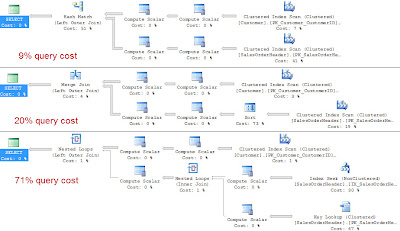
I was able to get the query optimizer to use each kind of physical join operator by supplying a hint.
select * from AdventureWorks.Sales.Customer c
left join AdventureWorks.Sales.SalesOrderHeader soh on c.CustomerID = soh.CustomerID
select * from AdventureWorks.Sales.Customer c
left join AdventureWorks.Sales.SalesOrderHeader soh on c.CustomerID = soh.CustomerID
option (merge join)
select * from AdventureWorks.Sales.Customer c
left join AdventureWorks.Sales.SalesOrderHeader soh on c.CustomerID = soh.CustomerID
option (loop join)

Thursday, November 3, 2011
Hash Join
SQL Server supports three physical join operators: Nested Loops, Merge and Hash.
The hash join works well for large sets of data. The hash join has two phases, the build and probe. First in the build phase, the rows are read from the first table and hashes the rows based on the join keys and creates has table in memory. The second phase, the probe phase, the hash join reads all the rows from the second table and hashes these rows based on the same join keys. The hash join then returns the matching rows.
In pseudo-code, it shall look something like the following.
for each row Row1 in the build Table
begin
perform hash value calc on Row1 row join key
insert Row1 row into hash bucket
end
for every row Row2 in the probe table
begin
calc the hash value on row Row2 join key
for every row Row1 in the hash bucket
if row Row1 joins with row Row2
return (row Row1, row Row2)
end
Below is an example of a select statement in which the optimizer should use a merge join operator.
select * from AdventureWorks.Sales.Customer c
left join AdventureWorks.Sales.SalesOrderHeader soh on c.CustomerID = soh.CustomerID

SQL Server tries to use the smaller of the two tables as the build table. SQL Server does this to try and reserve precious memory. While SQL Server attempts a best guess at guessing the amount of memory needed, if SQL has guessed to low it will spill out to tempdb to continue joining for the hash join operation.
The hash join works well for large sets of data. The hash join has two phases, the build and probe. First in the build phase, the rows are read from the first table and hashes the rows based on the join keys and creates has table in memory. The second phase, the probe phase, the hash join reads all the rows from the second table and hashes these rows based on the same join keys. The hash join then returns the matching rows.
In pseudo-code, it shall look something like the following.
for each row Row1 in the build Table
begin
perform hash value calc on Row1 row join key
insert Row1 row into hash bucket
end
for every row Row2 in the probe table
begin
calc the hash value on row Row2 join key
for every row Row1 in the hash bucket
if row Row1 joins with row Row2
return (row Row1, row Row2)
end
Below is an example of a select statement in which the optimizer should use a merge join operator.
select * from AdventureWorks.Sales.Customer c
left join AdventureWorks.Sales.SalesOrderHeader soh on c.CustomerID = soh.CustomerID

SQL Server tries to use the smaller of the two tables as the build table. SQL Server does this to try and reserve precious memory. While SQL Server attempts a best guess at guessing the amount of memory needed, if SQL has guessed to low it will spill out to tempdb to continue joining for the hash join operation.
Wednesday, November 2, 2011
Merge Join
SQL Server supports three physical join operators: Nested Loops, Merge and Hash.
The merge join requires that each table be sorted on the join keys. The merge join works by simultaneously reading and comparing the two sorted tables one row at a time. At each row, the merge join compares the next row from each table. If the rows match, the merge join outputs the joined row and continues on. If the rows do not match, the merge join discards the lesser of the two rows from the tables and continues. Because the tables are sorted, the merge join knows that it is discarding a row that is less than any remaining rows in either table.
In pseudo-code, it shall look something like the following.
get first row Row1 from Table1
get first row Row2 from Table2
while not at the end of either Table
begin
if Row1 joins with Row2
begin
return (Row1, Row2)
get next row Row2 from Table2
end
else if Row1 < Row2
get next row Row1 from Table1
else
get next row Row2 from Table2
end
Below is an example of a select statement in which the optimizer should use a merge join operator.
select * from AdventureWorks.Person.Contact e left join AdventureWorks.HumanResources.Employee c on c.ContactID = e.ContactID

Performance of the merge join is associated to the number of rows in each table. A merge join more than likely is a better choice for larger inputs compared to a nested loops join. Each table in the merge join is read only once.
The merge join requires that each table be sorted on the join keys. The merge join works by simultaneously reading and comparing the two sorted tables one row at a time. At each row, the merge join compares the next row from each table. If the rows match, the merge join outputs the joined row and continues on. If the rows do not match, the merge join discards the lesser of the two rows from the tables and continues. Because the tables are sorted, the merge join knows that it is discarding a row that is less than any remaining rows in either table.
In pseudo-code, it shall look something like the following.
get first row Row1 from Table1
get first row Row2 from Table2
while not at the end of either Table
begin
if Row1 joins with Row2
begin
return (Row1, Row2)
get next row Row2 from Table2
end
else if Row1 < Row2
get next row Row1 from Table1
else
get next row Row2 from Table2
end
Below is an example of a select statement in which the optimizer should use a merge join operator.
select * from AdventureWorks.Person.Contact e left join AdventureWorks.HumanResources.Employee c on c.ContactID = e.ContactID

Performance of the merge join is associated to the number of rows in each table. A merge join more than likely is a better choice for larger inputs compared to a nested loops join. Each table in the merge join is read only once.
Tuesday, November 1, 2011
Nested Loops Join
SQL Server supports three physical join operators: Nested Loops, Merge and Hash.
The nested loops join takes each row from the outer table and compares it to each row in the inner table and returns rows that are satisfied by the join predicate.
In pseudo-code, it shall look something like the following.
for each row Row1 in the outer table Table1
for each row Row2 in the inner table Table2
if Row1 joins with Row2 (predicate)
return (Row1, Row2)
Below is an example of a select statement in which the optimizer should use a nested loops join operator.
select * from AdventureWorks.HumanResources.Employee e
inner join AdventureWorks.Person.Contact c on e.ContactID = c.ContactID

The nested loops join performance is directly related to the number of rows in the outer table times the number of rows in the inner table. As the number of rows increase in the inner table, the cost grows quickly.
The nested loops joins is said to work best for small data sets and or where there is an index on the inner table.
The nested loops join takes each row from the outer table and compares it to each row in the inner table and returns rows that are satisfied by the join predicate.
In pseudo-code, it shall look something like the following.
for each row Row1 in the outer table Table1
for each row Row2 in the inner table Table2
if Row1 joins with Row2 (predicate)
return (Row1, Row2)
Below is an example of a select statement in which the optimizer should use a nested loops join operator.
select * from AdventureWorks.HumanResources.Employee e
inner join AdventureWorks.Person.Contact c on e.ContactID = c.ContactID

The nested loops join performance is directly related to the number of rows in the outer table times the number of rows in the inner table. As the number of rows increase in the inner table, the cost grows quickly.
The nested loops joins is said to work best for small data sets and or where there is an index on the inner table.
Saturday, October 29, 2011
A wait a day: sys.dm_os_wait_stats
In part 1 of the A wait a day series, we discussed the self induced WAITFOR statement. Before discussing further waits, I
thought it would be helpful to review the sys.dm_os_wait_stats dmv.
The sys.dm_os_wait_stats dmv returns details about waits that threads have encountered. The DMV returns five columns, wait_type, waiting_tasks_count, wait_time_ms, max_wait_time_ms and signal_wait_time_ms.
In general, there are three types of waits: Resource waits, External waits and Queue waits.
Resource waits include locks, network, latches and disk waits.
Queue waits tend to be seen when a worker is waiting for work or if the worker is idle.
External waits happen when SQL Server is waiting for an external even to complete.
The sys.dm_os_wait_stats dmv returns details about waits that threads have encountered. The DMV returns five columns, wait_type, waiting_tasks_count, wait_time_ms, max_wait_time_ms and signal_wait_time_ms.
In general, there are three types of waits: Resource waits, External waits and Queue waits.
Resource waits include locks, network, latches and disk waits.
Queue waits tend to be seen when a worker is waiting for work or if the worker is idle.
External waits happen when SQL Server is waiting for an external even to complete.
Friday, October 28, 2011
A wait a day: WAITFOR
This is part 1 of a series dedicated to SQL Server Waits. Part 1 will cover the WAITFOR statement, which does not introduce a wait, but I thought we could cover the statement.
The WAITFOR statement will block the processing of a batch, stored procedure or transaction based on the time or interval defined with the command.
The statement below waits 1 minute .
WAITFOR DELAY '00:01:00'
This statement below waits until 11:02 AM local time
WAITFOR TIME '11:02:00'
Example
DECLARE @HireTime Char(8)
SET @HireTime = '12:00:00'
--Select all employees in the system as of noon today
WAITFOR TIME @HireTime
SELECT * FROM AdventureWorks.HumanResources.Employee
If you have set the @HireTime variable far enough into the future, you can run the statement below to see what's happening behind the scenes.
SELECT r.Wait_type, r.wait_time, r.last_wait_type, r.open_transaction_count, t.text as SQLStatement
FROM sys.dm_exec_requests r .
cross apply sys.dm_exec_sql_text(r.Plan_handle) t.
WHERE session_id > 50
Be cautious when using the WAITFOR Statement as SQL Server uses a seperate thread for each WAITFOR occurance.
You cannot use WAITFOR in view definitions or when opening a CURSOR.
The WAITFOR statement will block the processing of a batch, stored procedure or transaction based on the time or interval defined with the command.
The statement below waits 1 minute .
WAITFOR DELAY '00:01:00'
This statement below waits until 11:02 AM local time
WAITFOR TIME '11:02:00'
Example
DECLARE @HireTime Char(8)
SET @HireTime = '12:00:00'
--Select all employees in the system as of noon today
WAITFOR TIME @HireTime
SELECT * FROM AdventureWorks.HumanResources.Employee
If you have set the @HireTime variable far enough into the future, you can run the statement below to see what's happening behind the scenes.
SELECT r.Wait_type, r.wait_time, r.last_wait_type, r.open_transaction_count, t.text as SQLStatement
FROM sys.dm_exec_requests r .
cross apply sys.dm_exec_sql_text(r.Plan_handle) t.
WHERE session_id > 50
Be cautious when using the WAITFOR Statement as SQL Server uses a seperate thread for each WAITFOR occurance.
You cannot use WAITFOR in view definitions or when opening a CURSOR.
Tuesday, October 25, 2011
Disk Latency SQL Script
Below is a script that I use to analyze disk latency and read/write ratios for my database server disks. The script is a combination of a couple of scripts from two different sources.
I'm borrowing the latency code from Listing 7-7 from Professional SQL Server 2008 Internals and Troubleshooting by Wrox Press. I'm borrowing the read/write ratios from Listing 2.1 from SQL Server Hardware from Redgate Books.
I added in some additional columns for drive letters, file extensions and disk latency thresholds.
I find the output very useful in determining if my storage system is keeping up with my SQL Server.
SELECT DISTINCT DB_NAME(Database_id) AS DB, FILE_ID,
io_stall_read_ms / num_of_reads as 'AVG read Transfer/ms',
CASE WHEN b.groupid = 1 THEN
CASE WHEN io_stall_read_ms / num_of_reads < 10 THEN 'Target'
WHEN io_stall_read_ms / num_of_reads between 10 and 20 THEN 'Acceptable'
WHEN io_stall_read_ms / num_of_reads > 20 THEN 'Unacceptable'
ELSE 'N/A' END
ELSE 'N/A' END AS ReadRange,
CAST(100. * num_of_reads / ( num_of_reads + num_of_writes ) AS DECIMAL(10,1)) AS [# Reads Pct] ,
CAST(100. * num_of_bytes_read / ( num_of_bytes_read + num_of_bytes_written ) AS DECIMAL(10,1)) AS [Read Bytes Pct] ,
io_stall_write_ms / num_of_writes AS 'AVG write Transfer/ms',
CASE WHEN b.groupid = 0 THEN
CASE WHEN io_stall_write_ms / num_of_writes < 10 THEN 'Target'
WHEN io_stall_write_ms / num_of_writes between 10 and 20 THEN 'Acceptable'
WHEN io_stall_write_ms / num_of_writes > 20 THEN 'Unacceptable'
ELSE 'N/A' END
ELSE 'N/A' END AS WriteRange,
CAST(100. * num_of_writes / ( num_of_reads + num_of_writes ) AS DECIMAL(10,1)) AS [# Write Pct] ,
CAST(100. * num_of_bytes_written / ( num_of_bytes_read + num_of_bytes_written ) AS DECIMAL(10,1)) AS [Written Bytes Pct],
LEFT(b.filename,3) AS DriveLetter, RIGHT(b.filename,3) AS FileExtension
FROM sys.dm_io_virtual_file_stats (-1,-1) a
INNER JOIN sys.sysaltfiles b on a.Database_id = b.dbid and a.file_id = b.fileid
WHERE num_of_reads > 0
AND num_of_writes > 0
I'm borrowing the latency code from Listing 7-7 from Professional SQL Server 2008 Internals and Troubleshooting by Wrox Press. I'm borrowing the read/write ratios from Listing 2.1 from SQL Server Hardware from Redgate Books.
I added in some additional columns for drive letters, file extensions and disk latency thresholds.
I find the output very useful in determining if my storage system is keeping up with my SQL Server.
SELECT DISTINCT DB_NAME(Database_id) AS DB, FILE_ID,
io_stall_read_ms / num_of_reads as 'AVG read Transfer/ms',
CASE WHEN b.groupid = 1 THEN
CASE WHEN io_stall_read_ms / num_of_reads < 10 THEN 'Target'
WHEN io_stall_read_ms / num_of_reads between 10 and 20 THEN 'Acceptable'
WHEN io_stall_read_ms / num_of_reads > 20 THEN 'Unacceptable'
ELSE 'N/A' END
ELSE 'N/A' END AS ReadRange,
CAST(100. * num_of_reads / ( num_of_reads + num_of_writes ) AS DECIMAL(10,1)) AS [# Reads Pct] ,
CAST(100. * num_of_bytes_read / ( num_of_bytes_read + num_of_bytes_written ) AS DECIMAL(10,1)) AS [Read Bytes Pct] ,
io_stall_write_ms / num_of_writes AS 'AVG write Transfer/ms',
CASE WHEN b.groupid = 0 THEN
CASE WHEN io_stall_write_ms / num_of_writes < 10 THEN 'Target'
WHEN io_stall_write_ms / num_of_writes between 10 and 20 THEN 'Acceptable'
WHEN io_stall_write_ms / num_of_writes > 20 THEN 'Unacceptable'
ELSE 'N/A' END
ELSE 'N/A' END AS WriteRange,
CAST(100. * num_of_writes / ( num_of_reads + num_of_writes ) AS DECIMAL(10,1)) AS [# Write Pct] ,
CAST(100. * num_of_bytes_written / ( num_of_bytes_read + num_of_bytes_written ) AS DECIMAL(10,1)) AS [Written Bytes Pct],
LEFT(b.filename,3) AS DriveLetter, RIGHT(b.filename,3) AS FileExtension
FROM sys.dm_io_virtual_file_stats (-1,-1) a
INNER JOIN sys.sysaltfiles b on a.Database_id = b.dbid and a.file_id = b.fileid
WHERE num_of_reads > 0
AND num_of_writes > 0
Thursday, October 20, 2011
Date formatting
I always feel like I'm digging around to find a list of date formats and what their outputs look like, so I've included a list below. I'm not going to discuss how each format breaks down the date, but I've included the formatting code along with the output. I may have missed a few, but the majority I have used in the past are listed below.
| format code | output |
| default | 2011-10-20 06:59:22.590 |
| convert(varchar,getDate(),100) | Oct 20 2011 6:59AM |
| convert(varchar,getDate(),101) | 10/20/2011 |
| convert(varchar,getDate(),102) | 2011.10.20 |
| convert(varchar,getDate(),103) | 20/10/2011 |
| convert(varchar,getDate(),104) | 20.10.2011 |
| convert(varchar,getDate(),105) | 20-10-2011 |
| convert(varchar,getDate(),106) | 20 Oct 2011 |
| convert(varchar,getDate(),107) | Oct 20, 2011 |
| convert(varchar,getDate(),108) | 06:59:00 |
| convert(varchar,getDate(),109) | Oct 20 2011 6:59:00:553AM |
| convert(varchar,getDate(),110) | 10-20-2011 |
| convert(varchar,getDate(),111) | 2011/10/20 |
| convert(varchar,getDate(),112) | 20111020 |
| convert(varchar,getDate(),113) | 20 Oct 2011 06:59:00:553 |
| convert(varchar,getDate(),114) | 06:59:00:553 |
| convert(varchar,getDate(),120) | 2011-10-20 06:59:00 |
| convert(varchar,getDate(),121) | 2011-10-20 06:59:00.553 |
| convert(varchar,getDate(),126) | 2011-10-20T06:59:00.553 |
| convert(varchar,getDate(),127) | 2011-10-20T06:59:00.553 |
| convert(varchar,getDate(),130) | 23 ?? ?????? 1432 6:59:00:553 |
| convert(varchar,getDate(),131) | 23/11/1432 6:59:00:553AM |
Wednesday, October 19, 2011
Free Ebook: SQL Server Hardware Choices Made Easy
Below is a free ebook available on Red Gate's site. SQL Server Hardware Choices Made Easy was written by Glenn Berry.
http://www.red-gate.com/products/dba/sql-virtual-restore/entrypage/sql-server-hardware-ebook?utm_source=forg&utm_medium=email&utm_content=glennberry_ebook20110825&utm_campaign=sqlvirtualrestore
For those of you who like the free ebook, I strongly suggest you buy his most recent hard copy book, SQL Server Hardware. http://www.amazon.com/SQL-Server-Hardware-Glenn-Berry/dp/1906434638

http://www.red-gate.com/products/dba/sql-virtual-restore/entrypage/sql-server-hardware-ebook?utm_source=forg&utm_medium=email&utm_content=glennberry_ebook20110825&utm_campaign=sqlvirtualrestore
For those of you who like the free ebook, I strongly suggest you buy his most recent hard copy book, SQL Server Hardware. http://www.amazon.com/SQL-Server-Hardware-Glenn-Berry/dp/1906434638
Free Ebook: Intro to Denali
The link below will take you to the place where you can download a free ebook that covers Denali, which is now called SQL Server 2012. This book is similar to the free ebook that was available for SQL Server 2008 R2.
http://blogs.msdn.com/b/microsoft_press/archive/2011/10/11/free-ebook-introducing-microsoft-sql-server-code-name-denali-draft-preview.aspx
http://blogs.msdn.com/b/microsoft_press/archive/2011/10/11/free-ebook-introducing-microsoft-sql-server-code-name-denali-draft-preview.aspx
Monday, October 17, 2011
Detecting the version of SQL Server
I always find myself using google to remember how to check for the exact version of SQL Server that I'm working with. @@Version always makes it more difficult to parse with everything thrown into a single column, so prefer a different method.
Below is a script that I like to Use. This is really just a combination of Method 3 and Method 4 from the following link:
http://support.microsoft.com/kb/321185
SELECT @@Version as FullDetail, SERVERPROPERTY('productversion') as VersionNumber, SERVERPROPERTY ('productlevel') as ServicePack, SERVERPROPERTY ('edition') as Edition
The above method is the way I teach people to do it, because I've seen a few Junior DBA's confuse the OS information as SQL Server info from some of the details in @@Version.
Below is a script that I like to Use. This is really just a combination of Method 3 and Method 4 from the following link:
http://support.microsoft.com/kb/321185
SELECT @@Version as FullDetail, SERVERPROPERTY('productversion') as VersionNumber, SERVERPROPERTY ('productlevel') as ServicePack, SERVERPROPERTY ('edition') as Edition
The above method is the way I teach people to do it, because I've seen a few Junior DBA's confuse the OS information as SQL Server info from some of the details in @@Version.
Saturday, October 15, 2011
SQL Server 2012
Although I did not attend PASS this year, one of the announcements was the next version of SQL Server (Denali) will be called SQL Server 2012. Like I said, I didn't make it to the summit this year, but below are some links containing recents news about SQL Server 2012.
http://www.informationweek.com/news/software/info_management/231900633
http://www.readwriteweb.com/enterprise/2011/10/sql-server-2012-microsofts-que.php
http://www.microsoft.com/sqlserver/en/us/future-editions.aspx
Please comment on this post if you have additional details or links to share. Thanks!
http://www.informationweek.com/news/software/info_management/231900633
http://www.readwriteweb.com/enterprise/2011/10/sql-server-2012-microsofts-que.php
http://www.microsoft.com/sqlserver/en/us/future-editions.aspx
Please comment on this post if you have additional details or links to share. Thanks!
Subscribe to:
Posts (Atom)